Creating Applications#
Starting with version 7.5, Arches adopted a new architectural pattern to support the need for implementors to easily share and maintain custom code. This new pattern, called Arches Applications, is similar to using “installed apps” in Django. It allows for easier development and maintenance of custom features by aligning with standard Django practices.
Note
The Arches project uses the term “application” in a number of different senses. The term “application” is sometimes used with more standalone (not modular) software such as Arches for Science that is based on core Arches. However, most of the documentation below describes how to develop “extension applications”, which are modular components that can be reused in multiple Arches projects.
What’s an Arches Application?#
The term Arches application describes a Python package (usually pip installed) that provides some set of additional features beyond what core Arches provides. Arches application can be reused in multiple Arches projects.
Applications typically include some combination of models, views, templates, static files, URLs, etc. They’re generally wired into Arches projects with the INSTALLED_APPS setting.
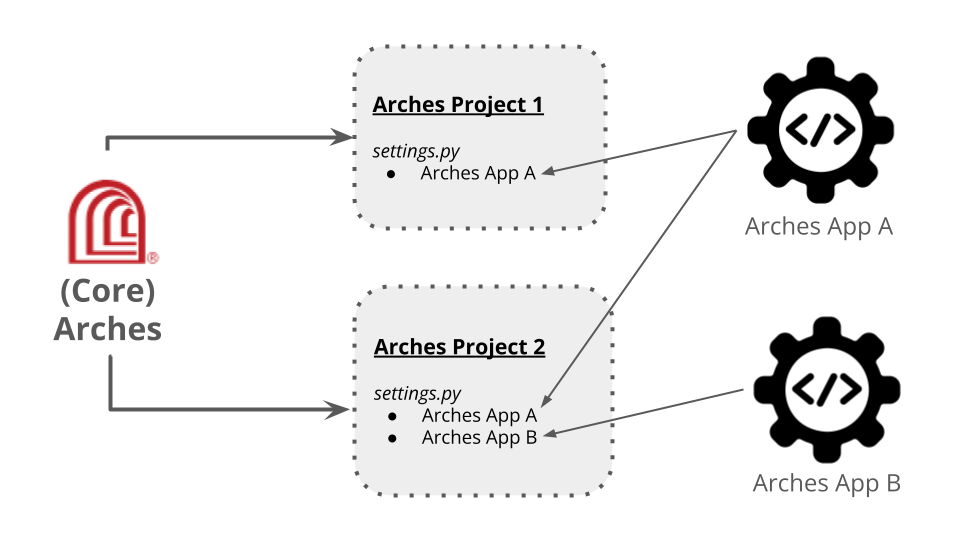
Illustration of Arches projects integrating custom Arches Application.#
When are Arches Applications Useful?#
Arches Applications are a means to power special purpose features that may not be appropriate for incorporation into the core (standard) Arches application. A given Arches Application can be under version control independent of core Arches. This should make it easier to update, upgrade, and maintain a custom Arches Application independently of Arches core.
Just like Arches itself, an Arches Application can also be developed, shared with the public, and be made open source. This means that the custom features powered by an Arches Application can be reused widely across the community. Because Arches Application development can proceed independently of core Arches, Arches Applications can be an excellent way for community members to experiment with features beyond those listed on the official Arches software development roadmap official Arches software development roadmap.
Arches for Science illustrates the value of Arches Applications. Arches for Science has several workflows and features (together with additional software dependencies) useful for cultural heritage conservation science. However, these features would be unnecessary for many other core Arches use cases. Keeping these conservation science features in a distinct application allows Arches for Science software development to continue at its own pace, and it reduces pressures to add highly specialized features to core Arches. Arches Applications can therefore help reduce the complexity and maintenance costs of core Arches.
Arches for Science is a standalone Arches application. It is not intended to be used as a component for mixing and matching with other Arches applications. On the other hand, Arches Controlled Lists is an Arches Extension Application that is specifically intended to be used as a reusable modular component for multiple Arches projects. See Arches Extension Applications for more details and links to currently released Arches extension applications.
Arches Applications Can Help Avoid Forks#
Arches Applications (of both the standalone and extension variety) allow you to add special features to an Arches instance without forking the core Arches code. Avoiding forks has several benefits, including easier maintenance and the ability to apply upgrades and security patches provided by core Arches.
A given Arches Application can also be developed and shared open source. This means that the custom features powered by an Arches Application can be reused across the community in multiple Arches projects.
Developing an Arches Application#
While any given Arches Application can be reused in multiple Arches projects, one must first create an Arches project to host the Arches Application you seek to develop. You start with the following command to create a new Arches project to host your Arches Application:
# Create a new Arches project for your Arches Application "example_app"
arches-admin startproject example_app
Arches Applications will sometimes require specific versions of core Arches to function properly. Therefore, their maintenance and upgrade paths should be carefully considered. In addition, different Arches Applications may have different dependencies (including other Arches Applications), which can complicate future upgrades. Finally, Arches Applications may require additional testing to ensure that they are compatible with Arches Applications and with the core Arches software. In creating an Arches Application, you can specify version information and version expectations for core Arches in the settings.py file of your application.
APP_NAME = "example_app"
APP_VERSION = semantic_version.Version(major=1, minor=0, patch=0)
APP_ROOT = os.path.dirname(os.path.abspath(inspect.getfile(inspect.currentframe())))
MIN_ARCHES_VERSION = semantic_version.Version(major=7, minor=5, patch=0)
MAX_ARCHES_VERSION = semantic_version.Version(major=7, minor=6, patch=2)
Getting Started with an Example Arches Application#
The Arches team created a simple example Arches Application to illustrate how to develop and deploy custom applications. The example application called Arches Dashboard displays a summary count of resource instances and tiles in a given Arches project.
The Arches Dashboard app provides an example of how to build a custom Arches application. Experience with Arches in general, and Arches project development in particular, would be very useful for Arches Application development.
Installing the Arches Dashboard Applications#
You can add the dashboard to an Arches project in just a few easy steps.
- Install it from this repo (or clone this repo and pip install it locally):
pip install git+https://github.com/chiatt/dashboard.git
- Add ‘dashboard’ to the
INSTALLED_APPSsetting in the demo project’s settings.py file, above your own project: INSTALLED_APPS = ( # other applications already listed "dashboard", "demo", )
- Add ‘dashboard’ to the
- Add routing to your project to handle the Arches application. This can be either subdomain routing or path-based routing.
- for subdomain routing:
- Update your hosts.py file in your project:
host_patterns = patterns('',
    host(re.sub(r'_', r'-', r'dashboard'), 'dashboard.urls', name='dashboard'),
    host(re.sub(r'_', r'-', r'demo'), 'demo.urls', name='demo'),
)
- for path-based routing:
- Update your urls.py file in your project. You’ll likely need to add the re_path import:
from django.urls import include, path
- and then the following path:
path(r"^", include("dashboard.urls")),
- From your project run migrate to add the model included in the app:
python manage.py migrate
- Next be sure to rebuild your project’s frontend to include the plugin:
npm run build_development
- When you’re done you should see the Dashboard plugin added to your main navigation bar:
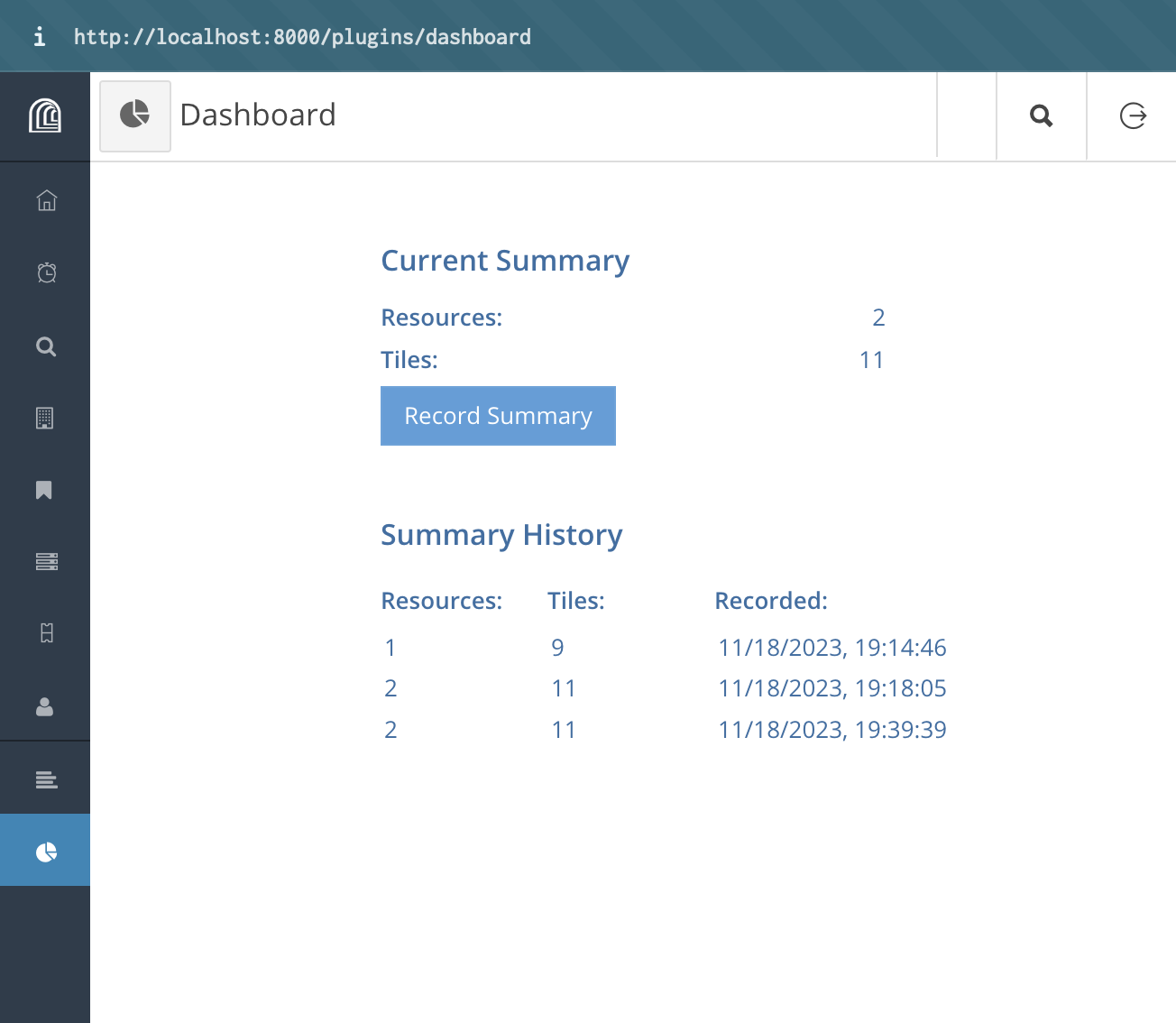
A screenshot of the functioning Arches Dashboard app.#