Resource Instance Lifecycles#
Resource Instance Lifecycles are a data management feature introduced in Arches version 8. They provide a way to manage the state of resources instance records in an Arches instance.
Overview#
By default, Arches comes with a standard (default) lifecycle where resource instances can have one of three states: draft, active, and retired. A developer can also define customized new lifecycles with their own custom states. A developer can also add custom functions to lifecycle states that can control actions to be performed on resource instances when they transition between different lifecycle states. Customization of lifecycles and lifecycle states can enable:
Rules for transitioning between states
Optional validation and permission logic tied to state transitions
Default Lifecycles#
Arches ships with two default lifecycles:
Standard Lifecycle
States: “draft”, “active”, “retired”
Default transitions: * draft → active * active → retired * retired → active * active → draft
This is the default lifecycle applied to all graphs unless specified otherwise
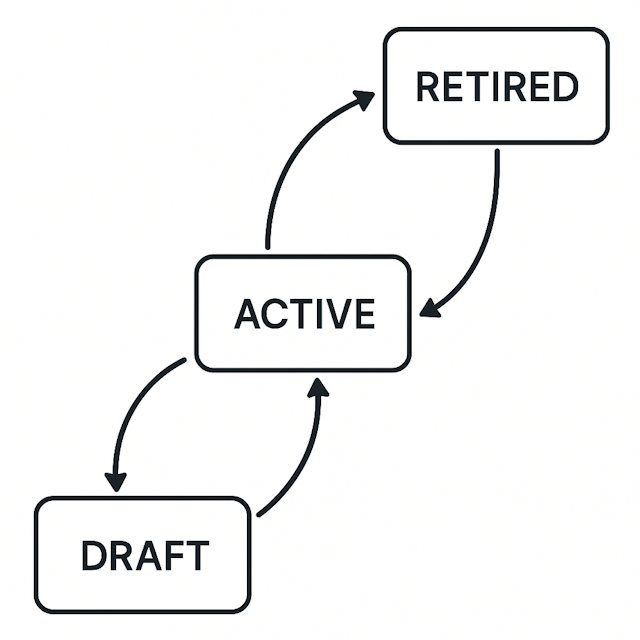
Standard lifecycle states and their possible transitions.#
Perpetual Lifecycle
Single state: “Perpetual”
No transitions
Used for resources that don’t need lifecycle state management
Implementation Details#
Resource Instance Lifecycles are implemented in Arches using Django models. Resource Instance Lifecycles are defined in the ResourceInstanceLifecycle model, which can be linked to graphs and resource instances. Each lifecycle can have multiple states defined in the ResourceInstanceLifecycleState model.
Lifecycle States#
Each lifecycle state has the following properties:
name: Display name for the stateaction_label: Label for the action button to transition to this stateis_initial_state: Whether this is the default state for new resourcescan_delete_resource_instances: Whether resources in this state can be deletedcan_edit_resource_instances: Whether resources in this state can be edited
Database Structure#
Lifecycles are implemented through several database tables:
resource_instance_lifecycles: Defines available lifecyclesresource_instance_lifecycle_states: Defines states within each lifecycleresource_instance_lifecycle_states_from_xrefandresource_instance_lifecycle_states_to_xref: Define valid transitions between statesresource_instances: Stores resources instance records with their current lifecycle state
Graph Configuration#
Graphs can be configured to use specific lifecycles:
class GraphModel(models.Model):
    # ...
    resource_instance_lifecycle = models.ForeignKey(
        "ResourceInstanceLifecycle",
        on_delete=models.PROTECT,
        related_name="graphs"
    )
State Transitions#
State transitions are managed through the Resource proxy model (see Arches Use of the Django ORM for more details). The transitions can be triggered programmatically using the Django ORM:
def update_resource_instance_lifecycle_state(self, user, resource_instance_lifecycle_state):
    # Updates the lifecycle state of a resource
    # Can include validation and permission checks
Custom Lifecycles#
Some Arches users may need to define a custom Resource Instance Lifecyle and custom lifecycle stages to support a team’s specific data editing and curation needs. A developer can create custom lifecycles:
Define a new lifecycle using the Django ORM or SQL:
lifecycle = ResourceInstanceLifecycle.objects.create(
    name="Custom Lifecycle"
)
Create states for the lifecycle:
state = ResourceInstanceLifecycleState.objects.create(
    name="Custom State",
    action_label="Make Custom",
    is_initial_state=True,
    can_delete_resource_instances=False,
    can_edit_resource_instances=True,
    resource_instance_lifecycle=lifecycle
)
Define valid transitions between states using the xref tables
Lifecycle Functions#
Arches supports lifecycle-specific functions that can be triggered during state transitions:
Function type:
lifecyclehandlerMethod:
on_update_lifecycle_stateThese functions can implement custom validation, permissions, or other business logic
Migration Considerations#
When migrating existing Arches data:
The default migration will place all resources in the “active” state of the standard lifecycle
Custom migration scripts can be written to set specific states based on resource attributes
Permissions and Validation#
While lifecycles don’t directly integrate with the permissions system, you can:
Implement custom permission logic in lifecycle transition functions
Use pre-save and post-save events to enforce rules
Implement attribute-based access control based on lifecycle states
Example Use Cases#
Resource Instance Lifecycles provide a framework to manage collaboration in the curation of resource instance records. For example, data managers can use lifecycles to control the flow of resource instances through various stages of review and publication. Resource instances can be flagged as “draft” while being prepared, then transitioned to “active” when ready for public access, and finally moved to “retired” when no longer relevant.
Content Management#
Draft → Active: Content review and publication
Active → Retired: Content flagged as deprecated or outdated, but not (physically) deleted.
State Management#
Use “draft” for resources in preparation
Use “active” for published/current resources
Use “retired” for logically deleted resources
Data Quality#
Draft: Initial data entry
Active: Verified data
Retired: Superseded or incorrect data
Logical Deletion#
Use “retired” state instead of physical deletion
Maintain referential integrity
Allow for data recovery if needed
Validation and Permissions#
A developer can implement custom Arches Functions to build validation rules for state transitions
A developer can also implement custom permission logic for state transitions. Doing so can make use lifecycle states as part of attribute-based access controls.